Shopify · 2023
Building flexible payment capture for B2B merchants
Role
Lead Designer
Team
1UX Designer (me)
1UX Writer
1Product Manager
4Engineers
Platform & Timeline
Desktop
8 months
Impact
$2.8M GMV in first month
760+ stores enabled
Problem
Shopify merchants had no native way to capture payment at fulfillment, forcing them to manually capture orders, or pay for third-party apps.
For high-volume B2B merchants, this meant hours of manual work each week and thousands of dollars in recurring app fees. For something so deeply tied to how they ran their business, the frustration was hard to ignore.
Context
96.24% of merchants use automatic capture. The remaining 4% capture manually, but account for over $1B in GMV every month.
Explore an interactive version of Shopify’s current settings.
Payment capture method
Choose between automatic and manual capture.
Automatically capture payment for orders.
The customer's payment method is authorized and charged automatically.
Manually capture payment for orders.
The customer's payment method is authorized at the time of their order. You'll need to manually capture payment within the authorization period.
Insight
For many of these merchants, capturing payment at fulfillment isn't optional. It ensures compliance, accurate tax reporting, and fraud protection.In Denmark, it's even the law.
"In Denmark, it's illegal to capture a customer's payment before we fulfill the item."
Merchant · EU region
"I lose over $50,000 in processing fees each year."
Merchant · Supplements brand, D2C
"We hired developers to build our own tool for automatic capture on fulfillment."
Merchant · Industrial parts, B2B
"I'm surprised Shopify doesn't have this yet — capturing on fulfillment is an industry standard."
Merchant · Footwear label, D2C & retail
Goals
Before designing, I aligned with the PM and engineers on a project brief, outlining the goals and metrics to guide our work.
Business goals
- Expand Shopify's footprint with high-volume and B2B merchants
- Increase GMV by reducing reliance on third-party payment capture tools
- Strengthen Shopify's position against end-to-end commerce platforms
- Build a foundation for more granular fulfillment-based capture models
Merchant goals
- Automate payment capture at fulfillment so merchants can save time and improve order accuracy
- Reduce fees associated with fraudulent or unfulfilled orders
Design opportunity
How might we redesign payment capture beyond a binary model, defining how it exists across settings and order creation while building a scalable foundation for future iterations?
Design principles
Empower, but don't overwhelm
New features can overwhelm merchants who have to learn them. The design should fit their existing workflow and mental models to avoid disruption.
Easy to understand language
Payment flows are inherently complex. We used industry-standard terms but kept them as plain as possible, since clarity is critical when money is involved.
Impact
From 23 merchants in early access to $2.8M GMV, adoption outpaced expectations.
-
Early access
23
merchants in the early access preview
-
First 2 weeks
$687.5K
GMV attributed across nearly 10k orders
-
First month
$2.8M
GMV from 760+ stores enabling the setting
Featured in Shopify's Summer Editions 2023.
Solution
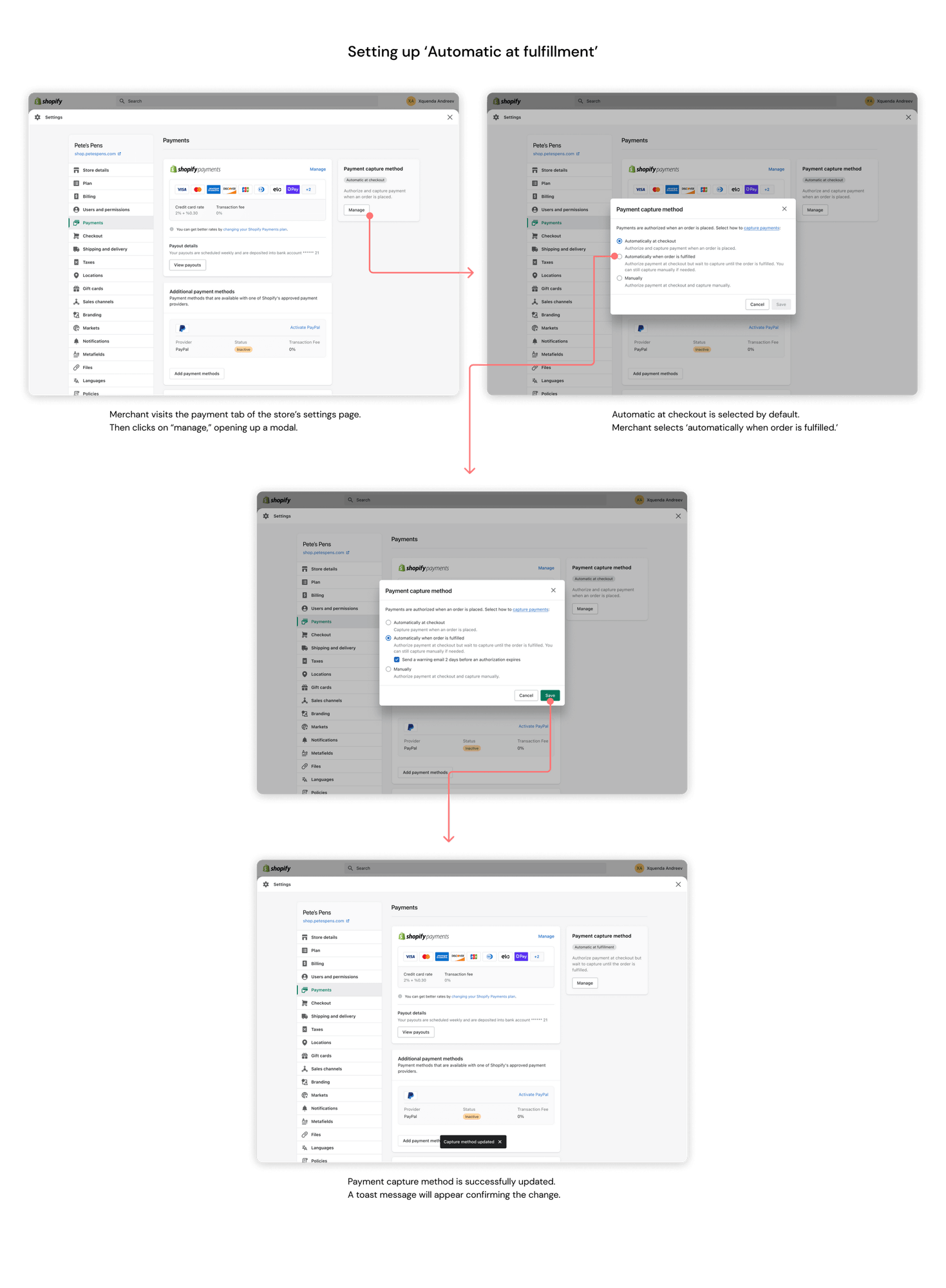
Introduced automatic capture at fulfillment as a new setting, and restructured the payment capture experience across settings and order creation into a more flexible, scalable model.
Say goodbye to manual processing.
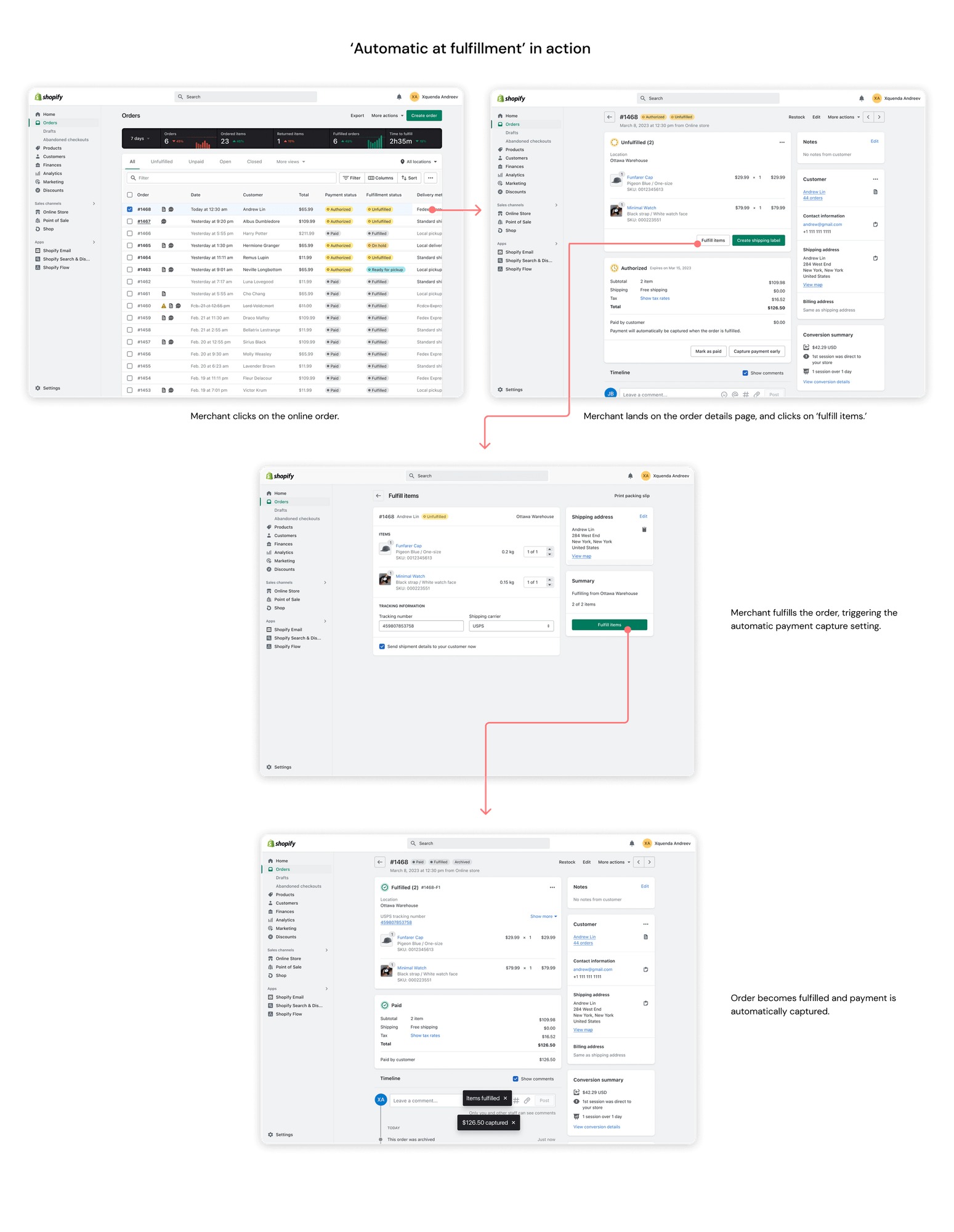
Payment is captured the moment an order is fulfilled — no more logging in to charge each order by hand or watching authorizations expire.
The all-in-one tool.
Every capture option now lives in one place. Automatic, manual, and capture-at-fulfillment sit side by side in a single, clear setting.
Need to capture early? No worries.
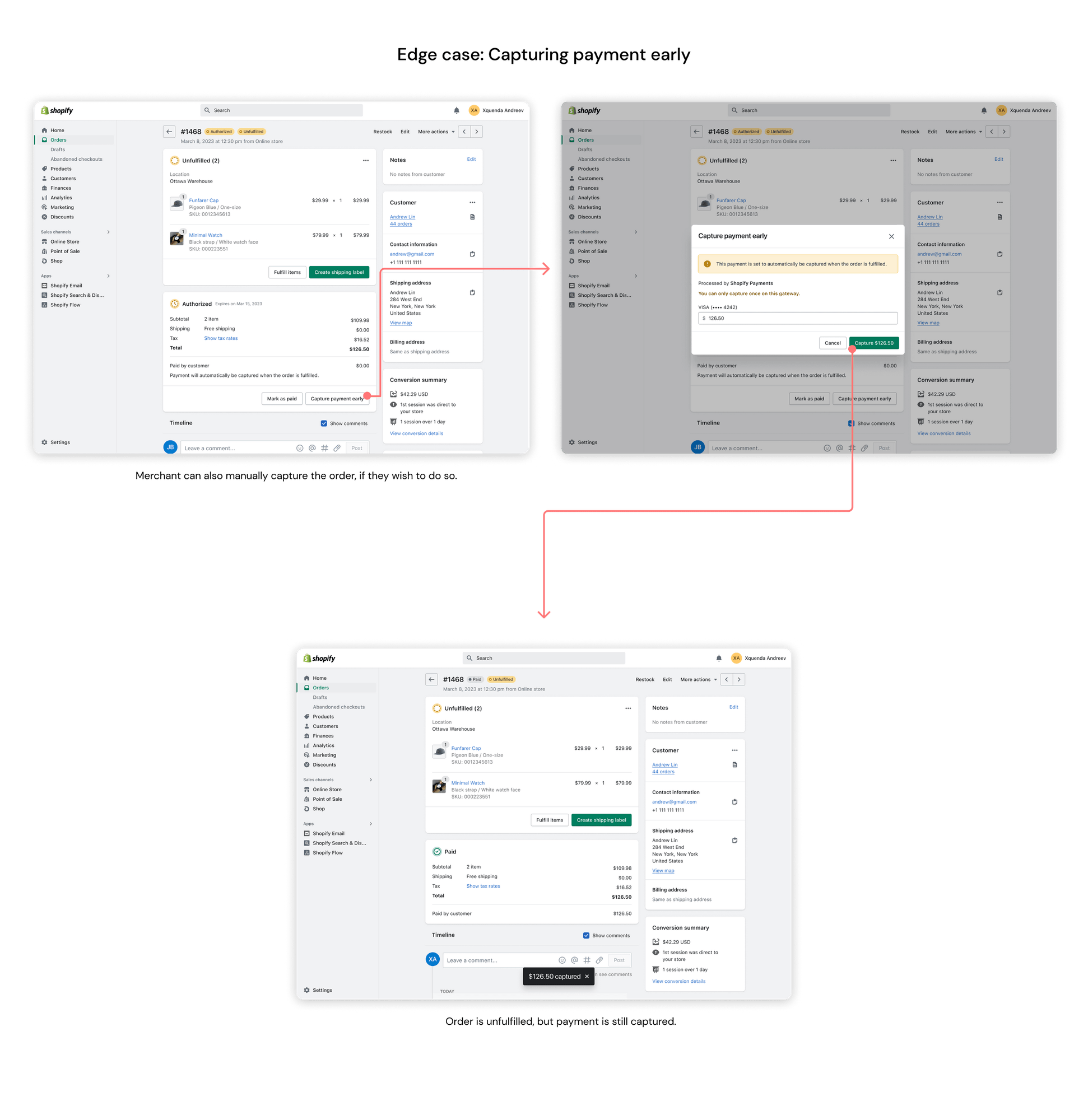
Need the funds before you ship? Capture an authorized order early, right from the order page, without leaving your normal workflow.
Early explorations
I collaborated with my content designer to mock up the options on Figma, prioritizing hierarchy and structure over word choice.
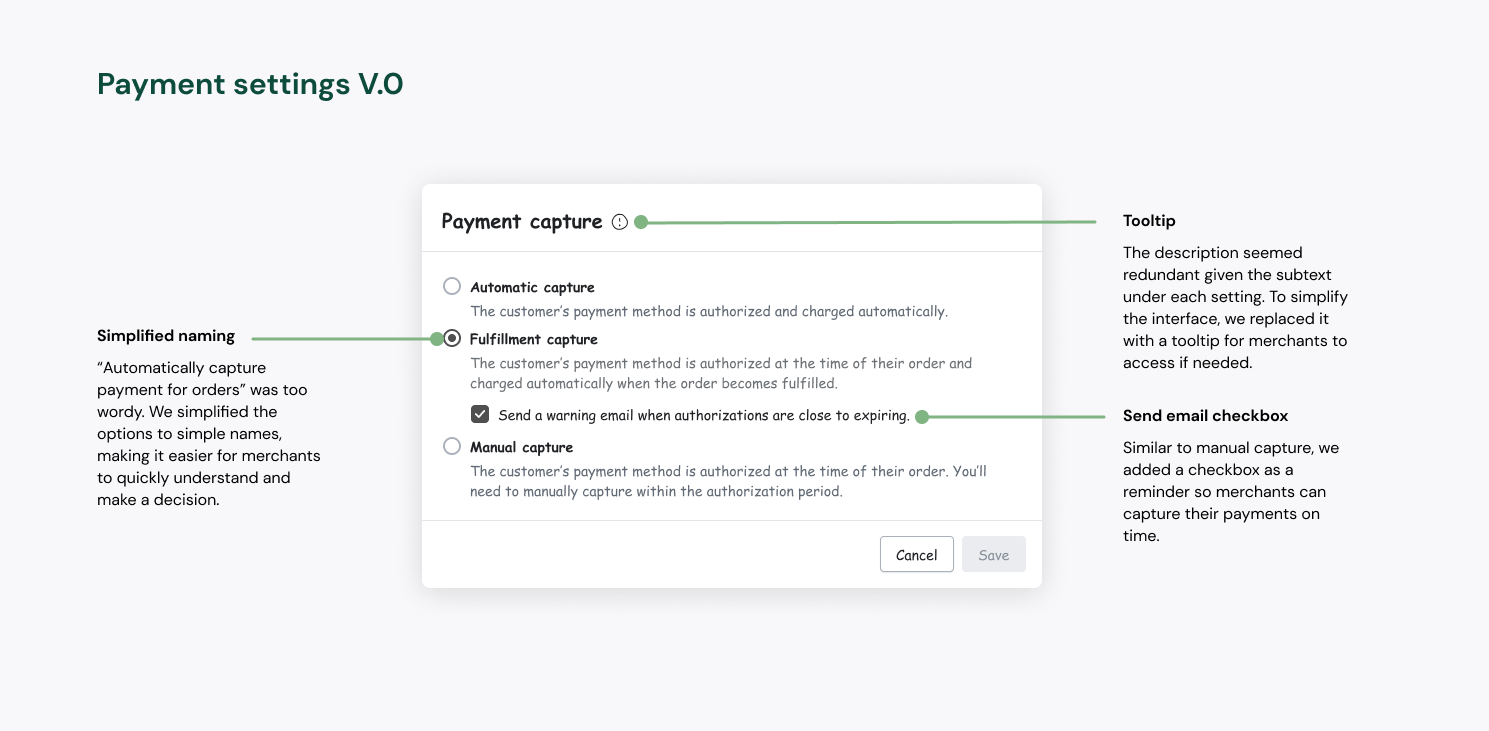
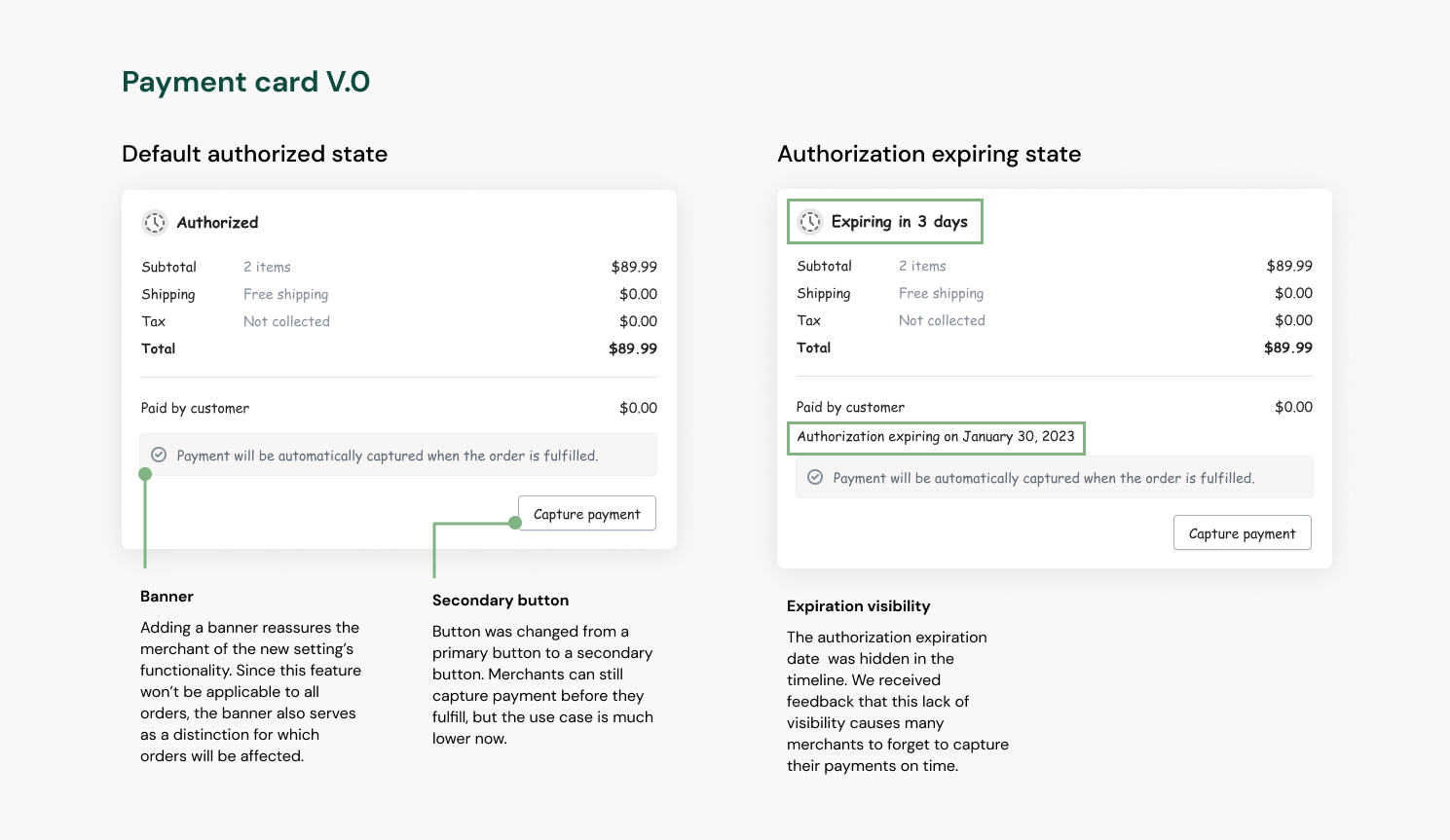
Through this exercise we discovered there were 3 different ways that we could structure the payment options:
- How much effort is involved (automatic vs. manual)
- What was happening (authorize and capture vs. authorize only)
- When it was happening (immediately vs. delayed, checkout vs. fulfillment)
Feedback & iteration
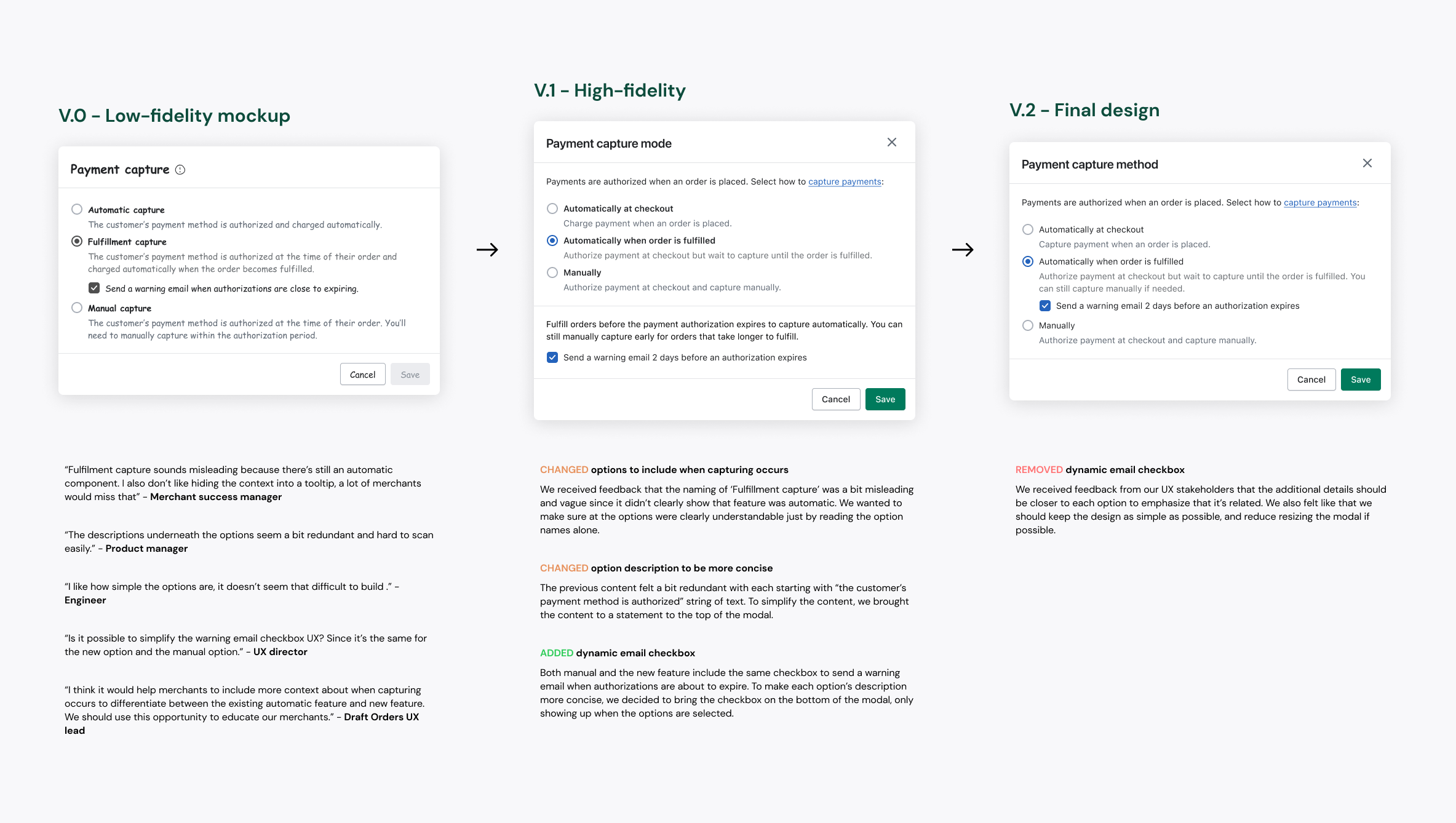
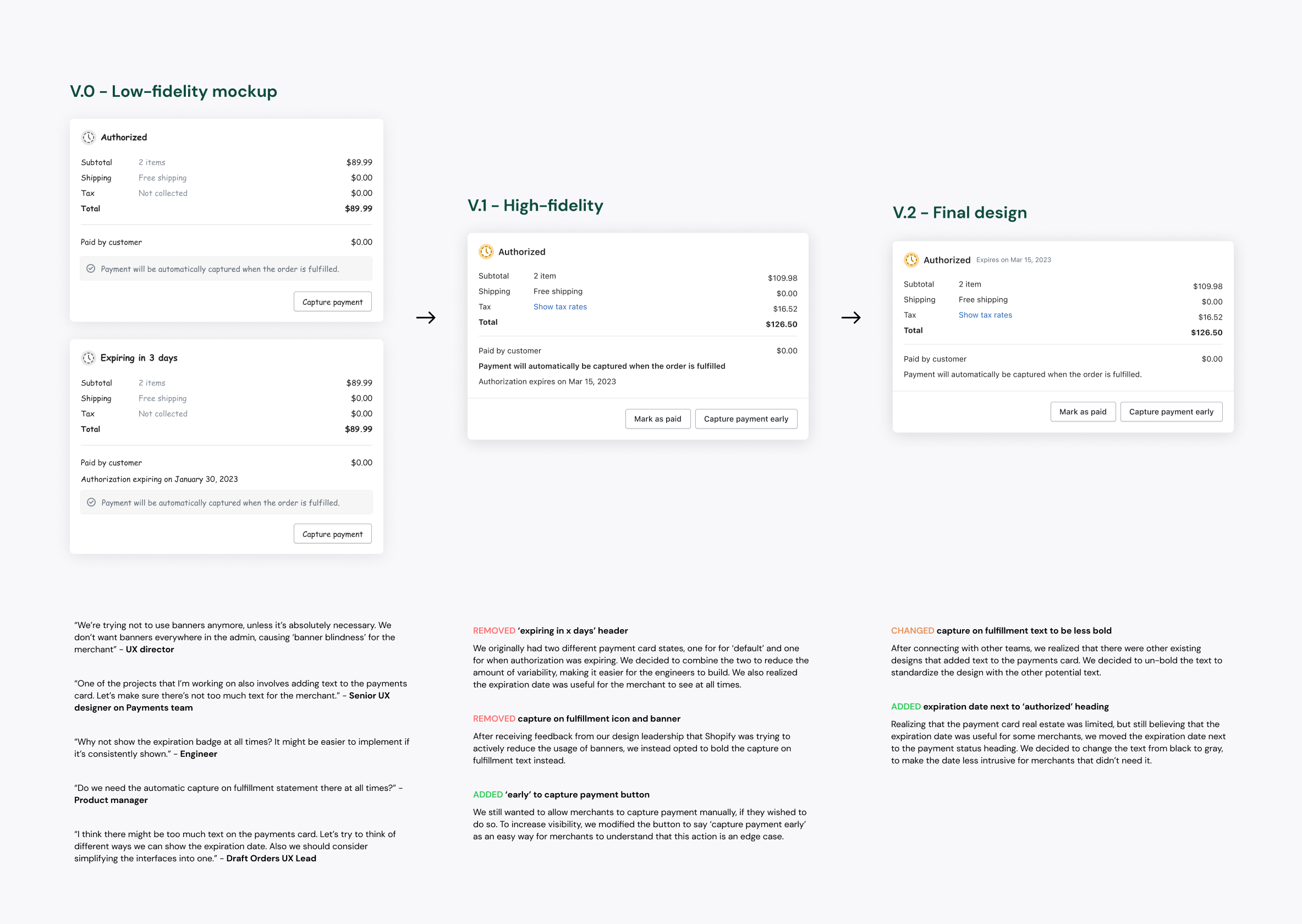
After sharing these low-fidelity mockups with stakeholders, we went through countless iterations, incorporating feedback from product managers, engineers, design leaders, and merchant success managers.
Final designs & flows
After incorporating all of the various feedback, we finalized the designs. Then, I arranged a design handoff meeting with the developers, walking them through the designs and answering their questions.
Reflection
My takeaways
01
Proactive communication is key
Aligning early and often with engineering, content, and risk partners kept a scalable model on track. Surfacing tradeoffs upfront, rather than discovering them late, let the team commit to a flexible foundation instead of patching a binary one.
02
Keep content simple
We were tempted to over-explain every edge case, but testing showed that merchants understood the setting with far less copy than we feared. Concise, well-placed guidance beat exhaustive warnings buried behind "learn more."